
DATABASE SEARCH HELP
Follow these steps to search the BHRR database:
| 1. Click SEARCH on the command menu bar:
| |

| |
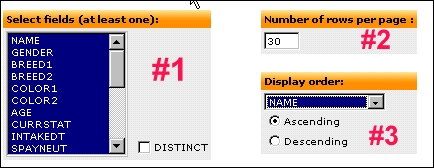
| 2. You should first set the display parameters, or how the results of your search will be displayed. In area #1, you can select exactly which record fields the search will return. As a default, all fields are selected. If you want you can pick and choose specific fields. In area #2, you can enter the number of records returned per page, default is 30. Area #3 sets the order in which the records are displayed. You should always select "NAME" by ASCENDING order. This will return records in alphabetical order based on the bunnies name. The order can be set to any field at all.
| |
| |
| 3. The most common search to do is on the bunny's name. If you know the exact spelling of the name you can search directly on it:
| |

| |
| 4. If you're not sure of the spelling of the name you can do a "wildcard" search by selecting "LIKE %...%" from the Operator dropdown box and providing a portion of the bunny's name, such as:
| |

| |
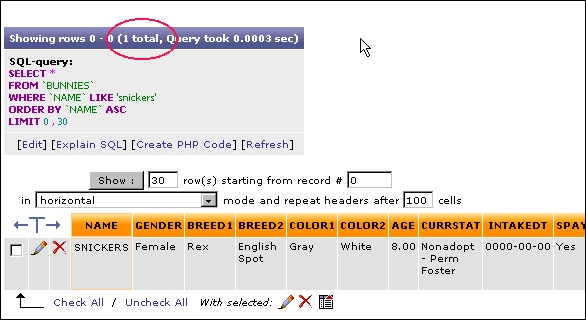
| Wildcard searches are especially useful to find records when you only have a partial last name or partial address for an adopter, or when you're looking for a keyword in the free-form Notes section of a record. Both the searches above will provide the same output record, as seen below. Something useful to notice is the number of records returned, circled in red. For a search that returns lots of records you may have several pages of results to examine.
| |
| |
| 5. You can search other fields or combine them. For instance, you can search using these two criteria:
| |
 
| |
| Each of these criteria is called a "search argument" and they are always connected with an AND. That means that any records returned from the database will have to satisfy BOTH these search arguments simultaneously. These two search arguments will return a list of Dutch bunnies adopted on or after January 1, 2005.
|
 To return to the main database help page click here.