
DATABASE LOGIN and ACCESS HELP
Follow these steps to access the BHRR database:
| 1. To begin database access click here. Enter the userID and password into the pop-up box. | |
| 2. Under "Site Management Tools" click on "phpMyAdmin". | 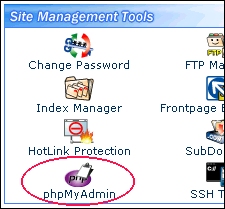 |
| 3. Select database "bunnyman_bhrr1 (1)" from the dropdown box on the left side bar. | 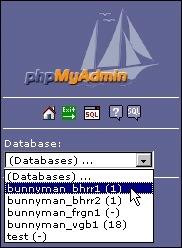 |
|
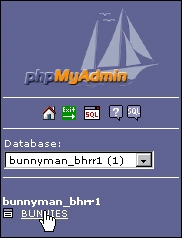
4. Click on BUNNIES table under the database name on the left side bar. HELPFUL HINT: Click on the BUNNIES table if you ever get lost or sent to a database page you don't recognize. It will always take you back to the "HOME" page (see next). |
 |
| 5. This will take you to the database home page with the command menu on the top:
NOTE: Please do not use the EMPTY or DROP commands. These could delete the entire database. | |
 To return to the main database help page click here.
